
Croptracker Mobile Farm Management App
A farm management app does what your field notebook used to
do — captures what happens on your farm the moment it happens —
but in a form your office, your payroll system, and your auditors
can actually use. The best farm management apps don't stop at one
task. They record labor time, spray applications, harvest yields,
and production practices from the field, then turn those records
into reports without anyone re-typing a line. They earn their
place in your field bag the same way a good worker does: by making
the day easier, not busier.
Search for "best apps for farm productivity" or "best apps for crop monitoring" and you'll get a long list of single-purpose tools: one app for weather, another for scouting, a third for time clocks. Most are good at their one job. The problem is what they create together — five apps, five sets of numbers, and double entry every evening. Croptracker's mobile farm management app takes the opposite approach: one app, built for specialty crop growers, that covers labor, sprays, harvests, and reporting — with the full platform behind it.
What to look for in the best farm management apps
The right checklist depends on your operation, but the
categories below are where good apps separate from gimmicks. If
you're still surveying the single-purpose landscape, our
guide to apps for farmers
is a useful map of what's out there.
In-field data entry that works offline
The field is where records are born, and connectivity isn't guaranteed there. A capable farm app accepts entries with no signal and syncs automatically when you're back online. Records entered once at the block never get written on paper and re-typed at the office — which is exactly where most transcription errors sneak in. Without offline support, an app is just an expensive digital clipboard.
Labor tracking and payroll
A farm app should track who worked, where, and the rate you owe them — by the hour or by the piece. Croptracker's farm labor tracking module includes the Punch Clock, with a Kiosk Mode that turns any device into a stationary sign-in station employees badge in and out of, plus piece-rate calculations that do the payroll math for you.
Spray and production records in the field
Pre-harvest intervals and re-entry times make spray records time-sensitive: the record belongs at the moment of application. Croptracker's spray record keeping module records production practices and spray applications from your smartphone as they happen, so the report is accurate and audit-ready without re-entering anything in the office.
Harvest tracking
Harvest is your biggest cost and your biggest data event. Record yields, bins, and picker productivity from the field with Croptracker's harvest tracking module, and the office sees tonnage and crew output in real time — not after everyone heads home.
Reports and audits
Records are only worth what they produce. Good farm apps compile timesheets, spray logs, and harvest records into the reports your GAP and traceability audits actually ask for. For a closer look at how apps support record keeping across categories, see our guide to farm management apps.
Cloud sync across every device
Phone, tablet, and desktop should show the same numbers at the same time. The best farm apps are cloud-based: enter a harvest on your phone and the office desktop, the packing shed tablet, and the auditor's export all reflect it immediately. No file transfers, no reconciling versions. The information follows the work, not the other way around.
How Croptracker's farm management app works
Croptracker's mobile apps are the field extension of our
farm management software platform
— the same records, modules, and permissions you use on your
computer, available from an iPhone or Android device. You enter
data in the field; it appears in real time for everyone with
access. Cloud-based records eliminate the headache of storing,
sorting, and retrieving physical records, and they kill the
spreadsheet-and-second-entry loop.
In the field, the app does more than capture data. Punch Clock's Kiosk Mode turns your device into a stationary kiosk where employees badge themselves in and out. Production practices, sprays, and harvests are recorded instantly on the smartphone in your pocket, which means fewer transcription mistakes and no waiting for paper records to reach the office. The same entries flow into payroll, spray logs, and yield totals — nobody has to tell the system twice.
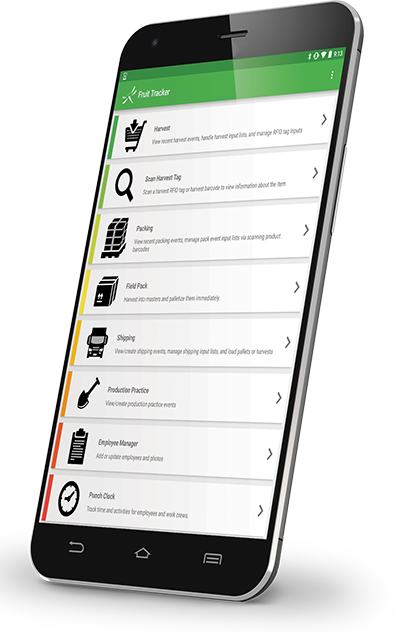
The app is available for iPhone and iPad on the App Store, and for Android on Google Play.


One app vs. five separate apps
A typical week for many growers looks like this: the weather
app says one thing, the scouting app stores notes nobody else can
see, the time clock produces hours that don't match the pay
spreadsheet, and the spray log lives in a different system
entirely. Reconciling that mess is real work — and it's exactly
the work that never shows up in a cost estimate. Nobody budgets
for it, but it shows up in every late payroll run.
A single farm management app removes the reconciliation. One source of truth for labor, sprays, harvests, and reports means no double entry, no version mismatches, and no hunting for last season's numbers. It also connects the dots single-purpose apps can't: block-level spray costs sitting next to block-level harvest yields give you profitability insights no isolated app can provide. The hours your crew saves on double entry go back into the field, and the hours you save on reporting go back on the books. Croptracker's modular pricing lets you start with the module that costs you the most this season and grow from there, so consolidating doesn't mean paying for features you don't use.
Is Croptracker right for your farm?
Three quick checks:
- You grow specialty crops — fruit, berries, vegetables, or orchard blocks where records vary from block to block and variety to variety.
- You need field record-keeping without guaranteed connectivity — the app's offline mode keeps records moving in the back forty.
- You need audit-ready reports — GAP, GHP, and traceability reports compiled from records your crew already entered, not assembled the weekend before the auditor arrives.
If those fit your operation, book a demonstration and we'll walk you through the app on your own fields.
Farm management app FAQ
Can Croptracker work offline?
Yes. You can record labor, sprays, and harvests in the field with no signal at all. The app stores your entries and syncs them to the cloud automatically once your device is back online, so nothing waits on connectivity.
What devices are supported?
The Croptracker app runs on iOS and Android phones and tablets, available from the App Store and Google Play. Because records live in the cloud, the same data appears on your desktop, tablet, and phone wherever you are working.
Do I need the web software too?
The mobile app works with the web software — it's the field-side version of the same system. Full reporting, payroll, and administration live in the web platform, while the app brings real-time entry and visibility to the field. Records entered in one place appear in the other instantly.
Can employees punch in from the field?
Yes. With the Punch Clock, employees badge in and out using the app, or through Kiosk Mode, which turns a device into a stationary sign-in station at the field entrance. Time entries flow straight into time cards and payroll reports.
Is my data synced and secure?
Yes. Croptracker records are cloud-based and synced across devices in real time, with access controlled per user. Physical records no longer need storing, sorting, or retrieving — and your data is available whenever you need it.
See it for yourself. Download the app from the App Store or Google Play, or book a demonstration to walk through Croptracker with our product experts — including how the mobile apps fit your specialty crop operation.